feb 172012
 

mft6version 6.2.5 (2012-02-09)

  • GEDCOM Import and Export improved
  • Several Sync issues with MobileFamilyTree Pro corrected
  • Memory usage reduced
  • State is now correctly shown in the Person Report
  • Several fixes for Mac OS X Lion
  • Minor user interface improvements

http://www.syniumsoftware.com/macfamilytree/
http://familien.lieberkind.ch/wp/macsoftware/#macfamilytree

feb 082012
 

geditcomiiversion 1.7 (2012-02-06)

This upgrade added three major features along with several minor ones. You should especially read about the new application support folders and the new place records before starting to use this version.

  • Place Records – this version introduces place records. The first time you open a file, it will create a place record of each unique place listed in individual or family records. You will probably be motivated to use all the new place editing options to organize the place information in your file. The task may lead to new insights into your genealogy research.
  • A new “Place Advisor” window gives you access to a large data base of information on places specially designed for genealogy research. This advisor is a helpful tool for organizing your place information.
  • Book Style Records – this version introduces book style records that help you automate the process of running the Generations LaTeX book. Furthermore, all documentation on the book creation process is now within the internal GEDitCOM II help.
  • New Application Support Folders – GEDitCOM II has always had two folders for application support files. The main install or “System” folder was in the “Library” folder of your hard drive with full path name /Library/Application Support/GEDitCOMII. In the “Open Format” and “Scripts” menus, the resources in this folder were called “System Formats” and “System Scripts”. The second or “User” folder was in your home directory with full path name /Users/(your user name)/Library/Application Support/GEDitCOMII. The resources in this folder were called “User Formats” and “User Scripts”. NEW: starting in version 1.7, these folders are moved and renamed.
  • Family tree charts were improved to allow portraits to be either to the left of the text or above the text.
  • When you attach a child, the child’s and parent’s birth and death dates will be checked to alert you of possible errors when the dates do not seem consistent with that individual being a child in that family.
  • You can sort multimedia objects by their date in individual or family records.
  • Two new menu commands let you copy and paste events between records.
  • Note and multimedia object records can be designated with a distribution setting, which affects some options when exporting them from the file.
  • The process to export GEDCOM data was improved, has new options to work with new place records and book style records, and has new options for embedding GEDitCOM II-specific data. The scripting command to export to GEDCOM file was updated to allow the new options.
  • Many improvements to the “Default Format”:
    • Pane bar shows number of events, multimedia, etc. available for that record.
    • Scaling of multimedia objects is more intuitive and has a “fit” option.
    • Pedigree chart in individuals and family group chart in families. These came from the former “Pedigree Format,” which is now deleted because it is not needed.
    • More information shown in table of children in families
  • All formats have been updated to support new place records and book style records (wherever appropriate).
  • The following are some minor changes and bug fixes:
    • Date sorting when some dates describe a range is always a challenge. The new version sorts by the midpoint of date ranges unless the date is qualified by “From,” in which case it sorts by the start of the range.
    • Report details on individuals with “Has Died” checked but no date or place, will appear in reports as “deceased.”
    • Add option to attach source a second time (such as to cite another page in the same source).
    • You can now type return or enter in any Search window text field to start the search. Furthermore, a “No Results” message is displayed if no results are found for a given search.
    • Toggling the GEDCOM editor in the Index window will retain a constant editing area size.
    • The Date preferences let you select case now when using abbreviated date words.
    • A new expression option to work with place records.
    • A new show browserpane with id scripting command was added.
    • A new refresh formats scripting command was added.
    • A new close child scripting command was added.
    • New count and countAll option in expressions to count tags in a record. It is used in the “Default Format” to display counts of various types of data in the window’s pane bar.
    • Can now control-click link button to multimedia object and select menu command to open the file immediately in a helper application.
    • A new spelling menu command can turn off Lion’s (annoying) automatic spell correction.
    • The Create Web Site script (in web sites) was merged with the user-contributed “Create Tabular Web Site” to use all its nice features and add some new ones.
    • Introduced a new Miscellaneous Tasks script (in editing tools) which may expand and new tasks are needed.
    • Added a new Find Lineage Errors script (in editing tools).
    • Added a user-written Timeline Report script to the default installation (in reports).
    • The user openFile, user openFolder, and user saveFile scripting commands now all have options to change the title for the panel and to display a message prompt in the window to help the user.
    • Now gives warning if try to set a multimedia object that is not at the main record level as a portrait.
    • Fixed error in Find and Merge Duplicates script that failed when the file had lineage errors. Also added new place records to the merging options.
    • The GEDCOM source editor would change size when toggled on and off, but now remembers its size.
    • Fixed error comparing dates that ARE ranges when deciding to merge two records.
    • Fixed issue comparing date ranges when deciding if two records can merge to better calculate which records can be nerged.
    • Fixed a bug that could cause a crash if multiple family tree windows were closed rapidly.
    • Fixed bug in date numbers scripting command for interpreted dates with no date text.
    • Fixed a bug when opening GEDCOM file (extension .ged) after opening other files.
    • Fixed a bug that could crash following various combinations of saving the file and opening and closing windows on certain computers and when working with files that are slow to save.
    • Improved method to decode GEDCOM data with many continuation and concatenation lines (CONT and CONC lines). It could run out of memory before (with 1MB note records); it now handles any length notes and is faster.
    • Fixed a bug that would crash when reading corrupted data when notes or sources link to themselves.
  • Improvements in the GEDitCOM Editor
    • Documentation on creating the new place editing fields
    • The CellBackground property of many cells can now use parent to set to the color of the parent object for the cell.
    • The tabWidth property can use negative numbers to expand the size of the cell if it’s text does not fit in the specified tab width.
    • A new watch property for cells implements a new method for updating one cell based on changes elsewhere in the file.
    • A new format property for ExpressonField cells. ExpressionField cells now also automatically display maps when they are assigned to the new _BOX tag in the new Place records.
    • Some fixes for use in Lion (such as to turn off automatic spell corrects in template code windows, which often have variables that are not spelled as actual words).
    • Fixed context color error for strings containing back slashes.

http://www.geditcom.com/
http://familien.lieberkind.ch/wp/macsoftware/#geditcom

sep 102011
 

mft6version 6.1.5 (2011-09-10)

  • Slideshow can now be controlled by using the keyboard
  • FamilySearch login problem solved
  • Fixes for the Narrative Report
  • Sync problems solved
  • Date Parser improved
  • Person List Report improved
  • Other minor fixes

http://www.syniumsoftware.com/macfamilytree/
http://familien.lieberkind.ch/wp/macsoftware/#macfamilytree

sep 032011
 

paw2uversion 100 (2011-09-02)

  • The appearance of the PAWriter application icon was improved.
  • The FrameMaker MML report features have been deleted. The Write MML menu item in the File menu and all its submenu items have been removed. FrameMaker for the Mac is an MacOS 9 application and has not been supported by Adobe Systems Incorporated for many years.
  • Most of the desktop publishing capabilities of FrameMaker now appear in Nisus Writer Pro2, and in some cases the capabilites in Nisus Writer Pro exceed those in FrameMaker. RTF files generated by PAWriter using the Write RTF menu item in the File menu are opened in Nisus Writer Pro by default (as well as being readable by other Mac word processors such as Microsoft Word, Pages, TextEdit, Tex-Edit, AppleWorks and Quick Look).
  • A bug in version 99 dated 1 July 2011 which affected the wallet window was fixed by removing the Close Wallet button. A wallet is still closed by clicking on the red close button in the upper left corner of the wallet window, by choosing Close Wallet from the Pictures menu or by pressing command-W.
  • PAWriter was compiled using Real Studio 2011 Release 2 — technical change only.
  • Tip: You can open the last data file you saved by choosing Apple menu > Recent Items and selecting the data file from the Documents list.
  • Note: Some testing has been done of PAWriter under Lion and so far all looks good. Of course, there are a number of new features under Lion that are not used so far by PAWriter, but otherwise PAWriter seems to execute just as it does under Tiger, Leopard and Snow Leopard.

http://www.lanopalera.net/Genealogy/AboutPAWriter.html
http://familien.lieberkind.ch/wp/macsoftware/#paw2u

aug 252011
 

mft6version 6.1.4 (2011-08-20)

  • New Database Maintenance function to show unparseable dates in your database
  • Database Maintenance improved
  • Several Mac OS X Lion user interface improvements
  • Date parsing improved
  • Errors in the kinship report fixed for nephews and nieces
  • Several bug fixes

http://www.syniumsoftware.com/macfamilytree/
http://familien.lieberkind.ch/wp/macsoftware/#macfamilytree

aug 142011
 

Ja ja, det sidste halve år har siden her været fuldstændig død. Jeg har brugt den smule tid jeg har haft online til at hjælpe med at redde det der engang var verdens bedste website fra lukning. Jeg håber inderligt at h2g2 snart vil blomstre igen. 🙂

Og selvfølgelig håber jeg det samme for “Lieberkind og alle de andre rødder“. Netop hjemvendt fra sommerferie har jeg i hvert fald omsider fået opdateret siden med sammenligninger af Slægtsforskningsprogrammer til Mac OS X, og vil igen begynde at skrive om programopdateringer og gode tilbud her på bloggen.

mft6Meget passende kan jeg begynde med et fint tilbud for dem der er hurtige: Resten af dagen – indtil kl. 6 mandag morgen dansk tid – kan MacFamilyTree købes til kun $24,49 på MacUpdate. De næste 14 dage kan programmet fås samme sted for $44,25.

I Australien fejrede de min fødselsdag forleden dag med at holde folketælling. Hvorfor ikke slutte dette indlæg med en af mine h2g2-venners kommentar til det?!
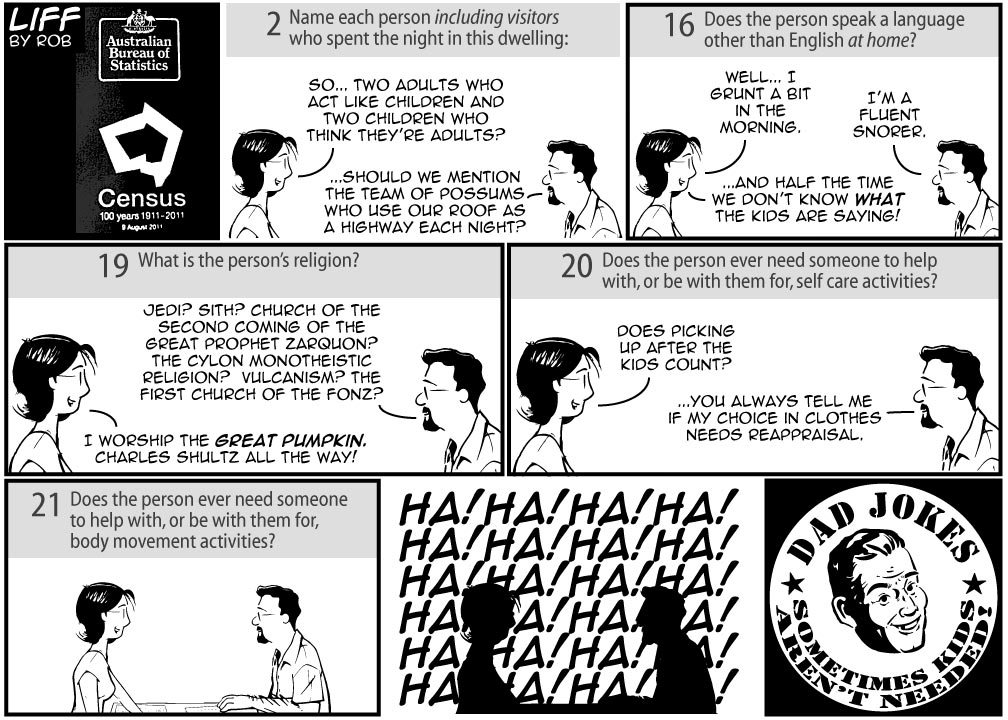
Consensus
Fra http://www.liffbyrob.com, benyttet med tilladelse

jan 272011
 

familytreemakerversion 19.2.1.241 (2011-01-22)

Family Tree Maker fortæller ikke (så vidt jeg ved) om versionshistorie på deres webside, jeg har ikke selv programmet (og modtager derfor ingen meddelelser igennem det) og udgaven i Mac App Store er stadig den gamle – men ifølge MacGenealogy.org blev programmet for få dage siden opdateret fra version 19.2.0.202 til version 19.2.1.141 (mærkelige numre!)

  • Numerous stability fixes were made
  • Child sort order is shown correctly in reports
  • Added support for GEDCOM 5.5.1
  • Numerous other fixes and enhancements

http://www.familytreemaker.com/Pages/Overview/Mac/Overview.aspx
http://familien.lieberkind.ch/wp/macsoftware/#familytreemaker

jan 222011
 

mft6version 6.0.11 (2011-01-10)

Obs: Programmet er opdateret 10. januar, og det er den dato der står i versionshistorien. Det er dog først blevet frigivet i dag, den 22. januar.
Versionen i Mac App Store er stadig 6.0.10 – opdateringen skal jo først godkendes af Apple før den bliver frigivet her.
Nu også opdateret i Mac App Store.
26. januar: Samtidig med at jeg ser den næste opdatering til version 6.0.12, bemærker jeg at datoen for version 6.0.11 nu er rettet til 22. januar i versionshistorien.

  • Problems uploading to MacFamilyTree.com fixed
  • General Web Export fixes
  • Localization updates

http://www.syniumsoftware.com/macfamilytree/
http://familien.lieberkind.ch/wp/macsoftware/#macfamilytree